
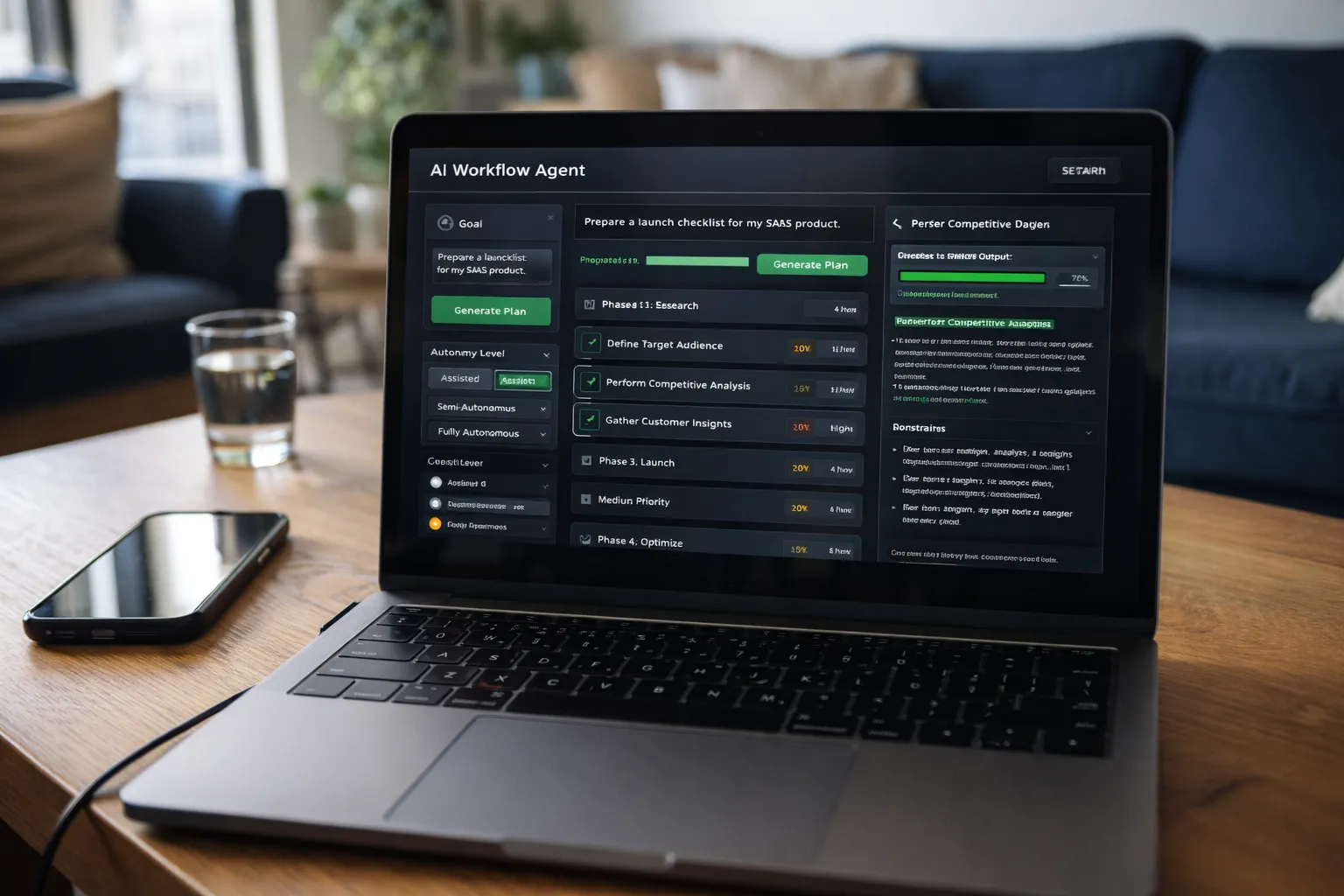
Build an Autonomous AI Workflow Agent That Plans and Executes Multi-Step Productivity Tasks

This app allows a user to define a goal in natural language, and the AI agent must:
1. Break the goal into structured steps
2. Create a plan
3. Simulate execution
4. Generate outputs
5. Reflect on results
6. Adjust the plan if needed
This must simulate a real AI agent loop:
Goal → Plan → Act → Evaluate → Adjust
The app must feel like a productivity operating system, not a chatbot.
⸻
Core User Flow
User enters:
“Prepare a launch checklist for my SaaS product.”
The system must:
• Parse the goal
• Generate a structured multi-step plan
• Show tasks grouped into phases
• Allow step-by-step execution simulation
• Track completion status
⸻
Required Features
1. Goal Input Panel
• Large input area
• “Generate Plan” button
2. Agent Planning Panel
Displays:
• Phase 1: Research
• Phase 2: Build
• Phase 3: Launch
• Phase 4: Optimize
Each phase must contain:
• 3–5 tasks
• Estimated effort
• Priority level
⸻
3. Execution Simulator
Each task can be:
• Marked complete
• Expanded to show “AI-generated output”
• Re-evaluated
When user clicks “Execute Step”, the agent must:
• Generate realistic structured output
• Show loading state
• Display reasoning
⸻
4. Reflection Engine
After completing a phase, the agent must:
• Analyze progress
• Suggest adjustments
• Identify risks
• Recommend next priorities
⸻
Unique Twist
Include an “Autonomy Level” selector:
• Assisted → user approves each step
• Semi-Autonomous → auto-completes low-risk tasks
• Fully Autonomous → generates full execution simulation automatically
UI must visibly change based on level.
⸻
UI Requirements
Dark mode only.
Minimal, high-clarity interface.
Layout:
• Left: Goal + Agent Controls
• Center: Plan Timeline
• Right: Task Details / Execution Output
Include:
• Phase progress bars
• Task priority badges
• Soft animations for state transitions
⸻
Technical Requirements
• Single-page app
• Pure HTML, CSS, JavaScript
• Modular architecture
• AI prompt builder function
• Structured agent loop implemented in JS
• LocalStorage for saved workflows
• Clean separation between:
• Planning logic
• Execution simulation
• UI state
⸻
Internal AI Prompt Template
You are an autonomous productivity agent.
Given the goal below, break it into structured phases and actionable tasks.
Follow this framework:
1. Goal Analysis
2. Strategic Phases
3. Actionable Tasks
4. Risk Assessment
5. Suggested Optimizations
Be structured and concise.
Goal:
{{USER_GOAL}}
⸻
Output Requirements
Return:
1. Complete runnable frontend code
2. Agent loop logic explanation
3. Internal AI prompt template
4. Instructions for connecting to real AI API
No placeholders.
No pseudo-code.
Tags
This app is not meant to be a chatbot with extra buttons. It is designed to simulate a true agent loop: goal → plan → act → evaluate → adjust.
The key difference between a normal AI tool and an agent system is memory, iteration, and visible reasoning. Every step should feel intentional. The user must be able to see how the agent arrived at a decision.
Architectural Tips
• Separate the system into three clear modules:
1. Planning engine
2. Execution engine
3. Reflection engine
Do not mix UI logic with agent logic.
• Store the workflow state as structured JSON so it can be exported or resumed later.
• Log every action the agent takes in a visible activity panel.
Planning Strategy
The agent should:
• Break large goals into phases first
• Then break phases into atomic tasks
• Assign priority and risk level
• Estimate effort in relative units (low, medium, high)
Avoid vague tasks like “improve marketing.” Tasks must be actionable.
Execution Simulation
When simulating execution:
• Show structured outputs, not paragraphs
• Include progress indicators
• Display decision reasoning in collapsible panels
• Allow manual override
Reflection Layer
After a phase completes:
• Evaluate success
• Identify bottlenecks
• Suggest scope adjustments
• Reprioritize remaining tasks
Reflection is what makes the system feel intelligent.
UX Philosophy
The UI must feel calm and analytical, not flashy. Subtle transitions only. No aggressive animations.
This tool should feel like a productivity operating system for founders, operators, and advanced users — not a toy planner.
If it feels deliberate, transparent, and structured, it’s working.
Save Prompt