Build a Local Cyberpunk Music Player With a Retro Synthwave Interface (Offline, One File)

This is not Spotify.
This is a personal instrument-like player for loading and experiencing music files locally.
The result must feel like:
• an underground audio terminal
• a synth control panel
• a forgotten cyberpunk OS music module
⸻
🎧 Core Concept (Unique Twist)
This player treats music playback as a system, not a playlist.
The UI should feel:
• technical
• slightly cryptic
• beautiful but functional
• like you are operating a machine
No feeds.
No recommendations.
No accounts.
⸻
📁 File Handling (Local-Only)
• Allow the user to upload audio files locally
• MP3
• WAV
• OGG
• Files never leave the browser
• Use the File API + Audio API
• Display loaded tracks in a terminal-style list
Optional:
• Drag & drop support
• Remember last loaded session using localStorage
⸻
🎛 Player Interface (Key Visual Feature)
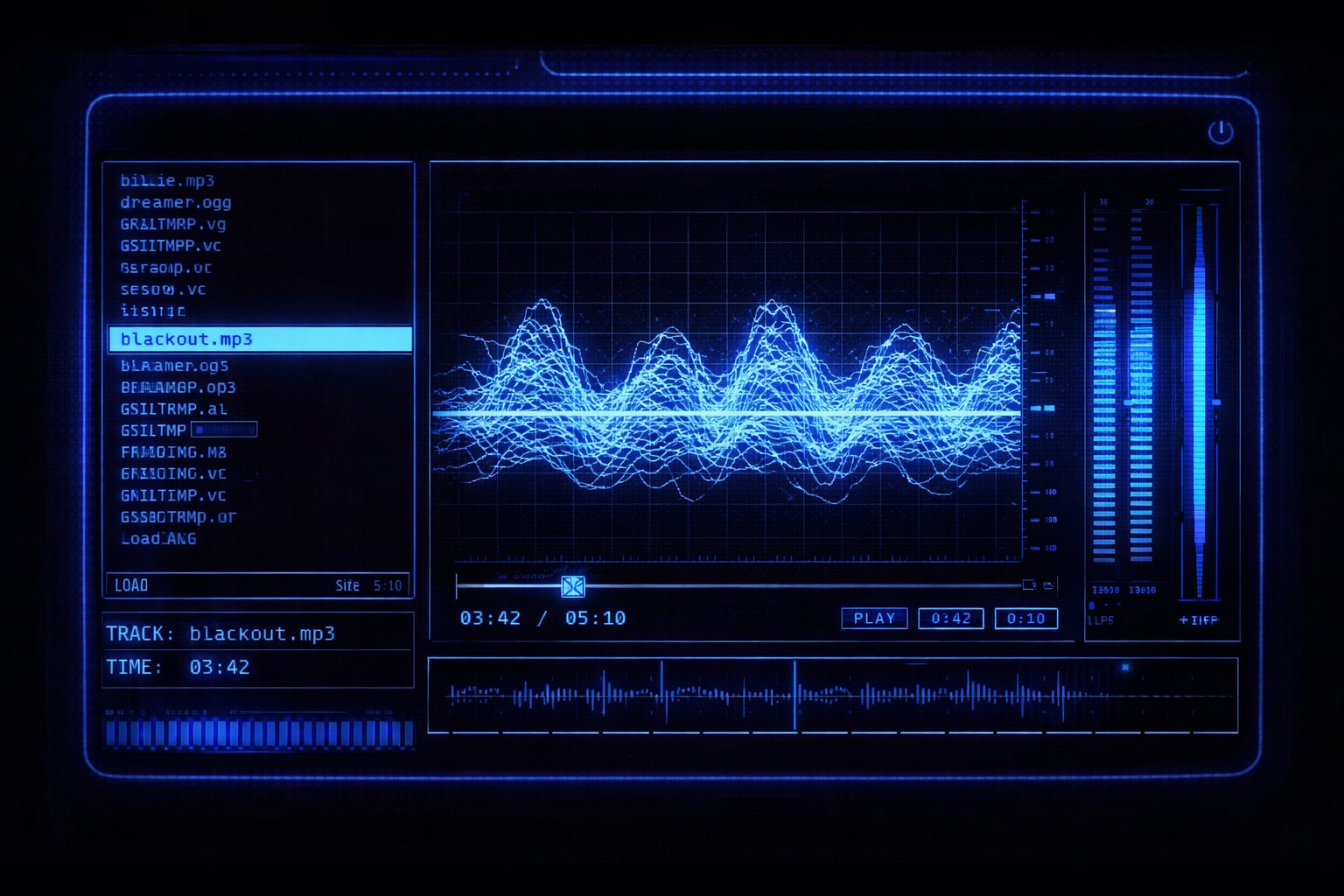
Design the player like a retro cyber audio console:
Required UI elements
• Central waveform display (animated in real time)
• Neon grid or oscilloscope-style visualization
• Soft glowing lines, no sharp modern edges
• Pixel or bitmap-inspired typography
• Blue / cyan / electric accents on deep black background
The waveform should:
• React to audio
• Feel “analog-digital”
• Slightly imperfect (scanline vibe)
⸻
🎚 Controls (Instrument-Style)
Controls should feel like hardware, not buttons:
• Play / Pause
• Seek bar styled as a signal line
• Volume as a vertical meter or rotary control
• Track selector styled like a system list
• Optional:
• Low-pass / high-pass filter toggle
• Visual theme switch (blue / amber)
No emojis.
No rounded modern icons.
⸻
🧠 UX Philosophy (Important)
• The UI should not explain itself
• Labels are minimal
• Users “learn” the interface by using it
• Everything feels intentional and calm
The player should feel like:
“I’m inside a machine made for sound.”
⸻
🎨 Visual Style Guide
• Dark mode only
• CRT glow effect (soft blur + subtle noise)
• Scanlines or grain (very subtle)
• Grid overlays
• Neon cyan / electric blue as primary color
• Optional amber or green as secondary accent
Avoid:
• Flat modern UI
• Material design
• Overly glossy effects
⸻
🛠 Technical Requirements
• Single HTML file
• Embedded CSS + JavaScript
• No external libraries
• Use:
• Web Audio API
• Canvas for visualization
• Clean, readable, commented code
Include a CONFIG section at the top for:
• Accent color
• Glow intensity
• Visualization density
• Default theme
⸻
📦 Final Output
Deliver:
1. One complete runnable HTML file
2. Clear separation between:
• audio logic
• visualization
• UI rendering
3. Short notes on how to extend:
• new visualizers
• keyboard controls
• full-screen mode
⸻
🧪 Optional Advanced Features (Nice to Have)
• Keyboard shortcuts
• Fullscreen “console mode”
• Visual reacts to frequency bands
• Boot-up animation on load
• “No track loaded” idle animation
Programming Languages
Tags
Intended experience
This player is meant to feel like:
• a personal audio instrument
• a cyberpunk terminal, not an app
• something you operate, not browse
It’s designed for focused listening, not background noise.
⸻
💡 Tips for Best Results
Tip 1: Keep the UI intentionally quiet
Avoid labels, tooltips, or onboarding. Let the interface teach itself through use.
⸻
Tip 2: Favor imperfection over precision
Slight jitter in waveforms, soft glow bleed, and imperfect alignment make the interface feel alive.
⸻
Tip 3: Design controls like hardware
Controls should feel like knobs, meters, and switches—not modern buttons.
⸻
Tip 4: Let the waveform lead the experience
The visualization should be the emotional center of the player, not the track list.
⸻
Tip 5: Use color sparingly
Limit to one primary accent color (cyan or blue) with one optional secondary (amber or green).
⸻
🧪 QA / Testing Checklist
• Audio loads and plays fully offline
• Waveform reacts smoothly to audio
• No console errors on load
• UI scales correctly on desktop and tablet
• Glow effects do not obscure readability
• Player works after refresh (if session restore is enabled)
⸻
🛠 Common Fixes
• Waveform feels flat: increase frequency band separation or add subtle depth offset
• Glow too strong: reduce blur radius and opacity
• Audio lag: lower FFT size or redraw rate
• UI feels modern: remove rounded corners and gradients
⸻
🔧 Extension Ideas (Stay on Theme)
• “Boot screen” animation before UI loads
• Keyboard-only control mode
• Visual theme presets (blue / amber / green)
• Fullscreen “terminal mode”
• Minimal track metadata view (no album art)
⸻
🎛 Design Constraint (Important)
Do not add:
• social features
• recommendations
• analytics
• playlists with thumbnails
• smart suggestions
The absence of features is the feature.
Save Prompt