
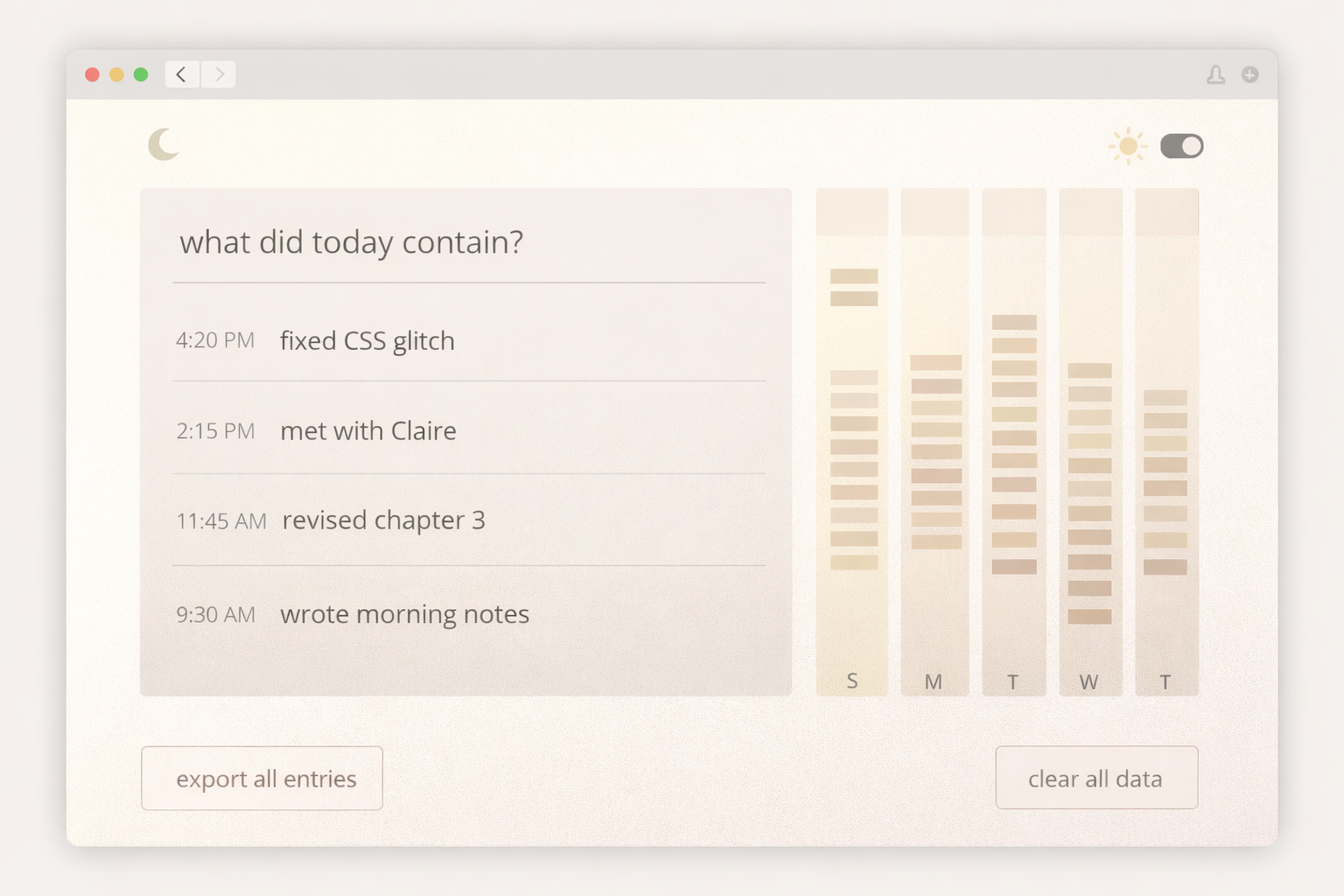
Build a Personal “What I Did Today” Activity Log Web App (Offline, One File)

This app does not ask me to plan.
It only lets me leave traces of real work after it happened.
Think of it as a digital paper margin, not a productivity dashboard.
⸻
🧠 Core Concept (Unique Twist)
This app treats activity logging as memory capture, not performance tracking.
Rules:
• No “to-do”
• No reminders
• No completion checkmarks
• No productivity scores
• No gamification
The app should feel like:
“I’m leaving a small mark that says: I was here.”
⸻
✍️ Interaction Model (Non-Generic)
One-line capture
• A single, always-focused input at the top
• Placeholder text changes subtly by time of day:
• Morning: “what did you work on?”
• Afternoon: “what are you in the middle of?”
• Evening: “what did today contain?”
Press Enter to log.
No buttons. No confirmations.
⸻
Timestamped fragments
• Each entry is stored as a short fragment, not a task
• Show the time softly (not loud or bold)
• Fragments stack vertically, newest on top
Entries should feel like:
• notes
• thoughts
• moments
• evidence of effort
⸻
🧭 Time-as-Texture View (Signature Feature)
Instead of charts or stats, create a “day texture” view:
• Each day is represented as a soft vertical column
• The number of entries affects the density, not the size
• Empty days are shown calmly, not as failures
No numbers.
No labels.
Just visual presence.
This is the app’s signature, and what makes it shareable.
⸻
🗓 Weekly Reflection (Non-Judgmental)
At the end of the week:
• Show all days side by side
• No totals
• No “best day”
• No advice text
Let the user see patterns without being told what they mean.
⸻
💾 Local-First, Private by Design
• Use localStorage
• No accounts
• No sync
• No analytics
• Data lives only in the browser
Include:
• Export all entries as JSON
• Clear all data with a clear confirmation
Privacy is a feature.
⸻
🎨 Visual Language (Important)
• Calm, neutral palette
• Soft motion only (fade, slide, ease)
• Rounded typography
• Gentle spacing
• Light and dark modes
The app should feel:
• quiet
• adult
• respectful
• non-demanding
⸻
🛠 Technical Constraints
• Single HTML file
• Embedded CSS + JS
• No external libraries
• Clean, commented code
• Easy to remix
Include a CONFIG section at the top for:
• App name
• Accent color
• Default theme
• Time-of-day prompts
⸻
📦 Final Output
Deliver:
1. A complete, runnable single-file app
2. A short explanation of the design choices
3. Notes on how someone could extend it without breaking the philosophy
⸻
🧪 Design Philosophy (Do Not Skip)
This app is intentionally incomplete.
It does one thing:
It helps someone remember that they did something today.
Nothing more.
Optimized for LLMs
Programming Languages
Tags
What makes this micro app different
• It logs evidence of effort, not plans
• It avoids productivity pressure by design
• It visualizes time as texture, not numbers
• It’s private: local-first, no accounts, no tracking
Ideal users
• Developers doing daily shipping
• Students tracking study sessions
• Freelancers logging client work
• Anyone who wants reflection without guilt
Recommended posting format for VibePostAI
• Include 1 screenshot of:
• the input bar + fragment list
• the “day texture” weekly view
• Add a short caption like:
• “A micro app that records what your day contained.”
⸻
✅ Tips
Tip 1: Keep entries short
Encourage “fragments” like:
• “fixed nav bug”
• “read 12 pages”
• “sent proposal”
Short entries reduce friction and increase consistency.
Tip 2: Use time-of-day prompts wisely
Make prompts feel human:
• morning: “what are you stepping into?”
• evening: “what did today hold?”
This makes it feel like a companion, not a tool.
Tip 3: Make the texture view subtle
No bright colors or harsh charts. The power is in calm visibility.
⸻
✅ QA / Testing Checklist (Quick)
• Logging works with Enter key
• Entries persist after refresh
• Day grouping is correct across midnight
• Export JSON downloads correctly
• Reset requires confirmation and truly clears storage
• Dark mode persists between sessions
• Mobile: input stays accessible with on-screen keyboard
• No console errors on load
⸻
✅ Common Fixes (If the model outputs bugs)
• If entries duplicate: ensure the submit handler prevents double fire
Model Settings (Optional but Helpful)
If your tool supports it
• Temperature: 0.3–0.6 (keeps code stable, still creative)
• Top P: 0.9 (balanced)
• Max tokens: high enough to output the full single-file app
Prompting tip
Ask the model to:
• “Output one complete HTML file only”
• “Keep everything offline, no CDNs”
• “Include a CONFIG section at the top”
• “Do not add extra explanations before the code”
💬 1 Comment
This is one of my favorite prompts here! Instant classic