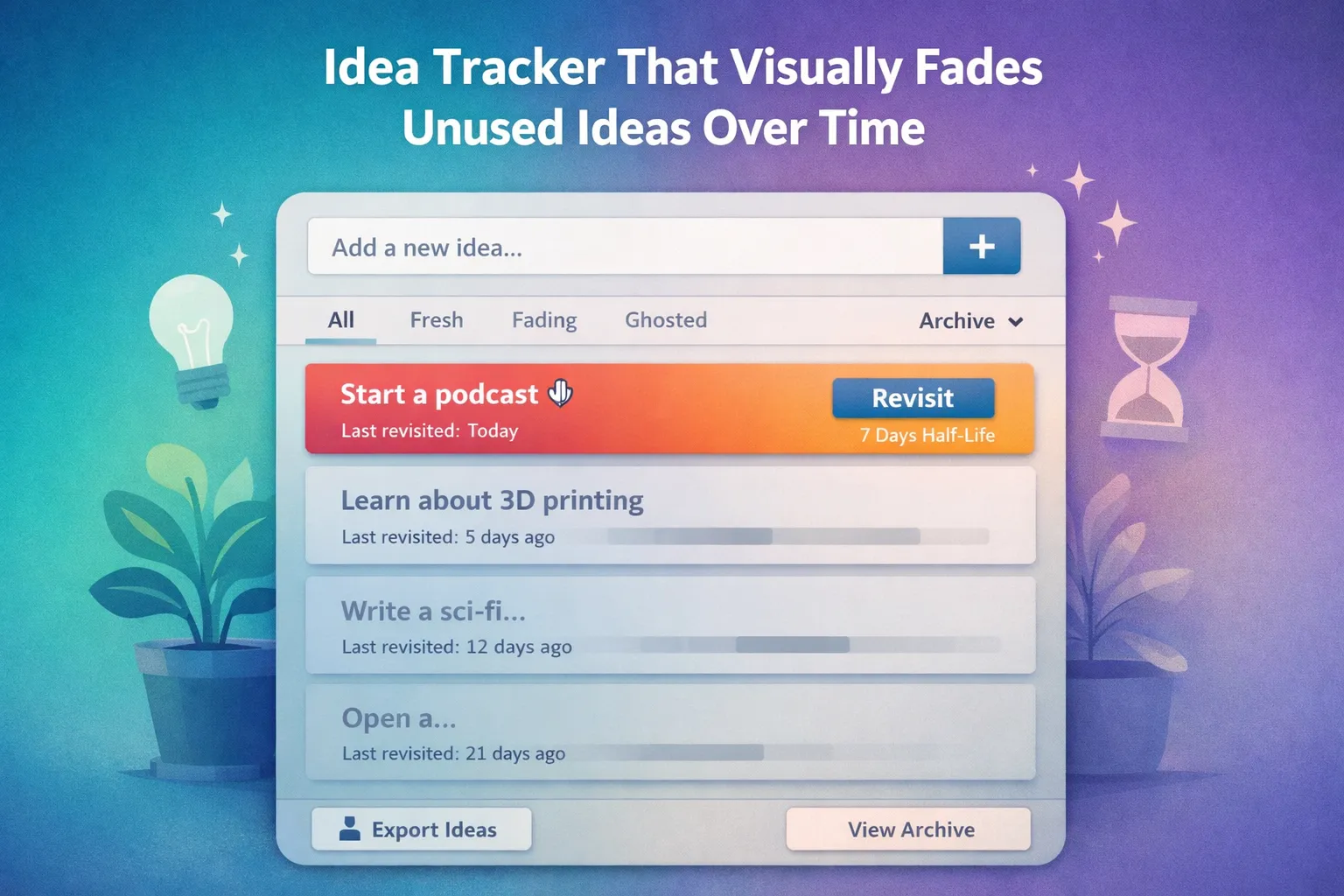
Build an Idea Tracker That Visually Fades Unused Ideas Over Time

This is not a to-do list.
This is not a note app.
This is a natural selection system for ideas.
The app should feel calm, modern, and slightly emotional—like watching thoughts evaporate.
⸻
🧠 Core Concept (Unique Twist)
Every idea has an attention half-life.
If the user does nothing, the idea gradually fades:
• visually (opacity, blur, “ink drying out”)
• structurally (it sinks lower in prominence)
If the user revisits an idea, it “survives” and regains clarity.
No reminders.
No notifications.
No guilt.
The interface should communicate:
“Ideas that matter tend to return.”
⸻
✍️ Core Features (Must Have)
1) Capture
• One clean input field: Title + optional one-line note
• Press Enter to save (keyboard-first)
• Ideas appear instantly in the list
2) Half-Life Decay System
Each idea stores:
• created timestamp
• last revisited timestamp
• decay setting (half-life duration)
Default half-life: 7 days
Allow per-idea half-life options:
• 1 day
• 3 days
• 7 days
• 14 days
• 30 days
Decay affects:
• card opacity
• slight blur
• saturation drop
• “paper aging” texture effect (subtle)
When an idea reaches near-zero visibility:
• it doesn’t disappear immediately
• it becomes “ghosted” at the bottom (still recoverable)
3) Revisit Ritual (Not a Like Button)
To refresh an idea, require a small intentional action:
• click and hold “Revisit” for 1.5 seconds
or
• press and hold the spacebar while focused
On revisit:
• fade animates back in
• “last revisited” updates
• the idea gently floats upward again
4) Views
Provide 2 views:
• Garden View (default): ideas as living/fading cards
• Archive View: compact list with filters (Active, Fading, Ghosted)
5) Search + Filters
• Search by title text
• Filter by state:
• Fresh
• Fading
• Ghosted
No sorting by “priority”.
6) Local-First Data
• Use localStorage
• Works offline
• Export/Import JSON
• Clear all data with confirmation
⸻
🎨 UX & Visual Style (Important)
• Calm minimalist UI
• Soft shadows, rounded cards
• Smooth transitions (opacity, blur, gentle drift)
• Light/Dark mode toggle saved to localStorage
• Subtle microcopy, no “productivity language”
Ideas should feel like:
• sticky notes losing ink
• sketches fading in a notebook
• a “memory garden” not a database
⸻
🛠 Technical Requirements
• Single HTML file
• Embedded CSS + JavaScript
• No external libraries
• Clean, commented code
• Include a CONFIG section for:
• default half-life
• decay curve (linear vs exponential)
• theme defaults
• animation intensity
Use an exponential decay model like:
• visibility = 0.1 + 0.9 * exp(-k * days_since_revisit)
(where k is derived from half-life)
Optimized for LLMs
Programming Languages
Tags
What this app is for
This micro app is designed to help users discover which ideas naturally persist without forcing prioritization, reminders, or productivity pressure.
Instead of asking “What should I work on?”, it asks:
“Which ideas return on their own?”
Ideas that matter tend to get revisited.
Ideas that don’t slowly fade—without being deleted or judged.
⸻
What this app is not
• Not a task manager
• Not a note-taking replacement
• Not an idea ranking system
• Not a productivity tool
It’s a signal filter, not a decision engine.
⸻
How to use it well
Tip 1: Keep ideas short
Use one sentence or less. The decay effect works best when ideas are lightweight and easy to revisit.
Tip 2: Don’t fight the fade
If an idea fades, let it. Resurrection should feel intentional, not habitual.
Tip 3: Use different half-lives
Fast half-lives (1–3 days) surface urgent thoughts.
Long half-lives (14–30 days) reveal long-term creative pull.
Tip 4: Revisit with purpose
Refreshing an idea should mean “this still matters,” not “I’m afraid to lose it.”
⸻
Common questions
Q: What happens when an idea fully fades?
A: It becomes visually ghosted but remains recoverable. Nothing is permanently deleted unless the user chooses.
Q: Why no reminders or notifications?
A: Because reminders distort signal. This app relies on memory and curiosity, not prompts.
Q: Can this replace my notes app?
A: No. It complements notes by filtering what’s worth deeper investment.
⸻
Philosophy reminder
This app doesn’t help you save ideas.
It helps you trust the ones that survive time.
💬 2 Comments
Love the idea..
the idea is pretty cool! Gemini did a great work for me here, thanks for commenting