
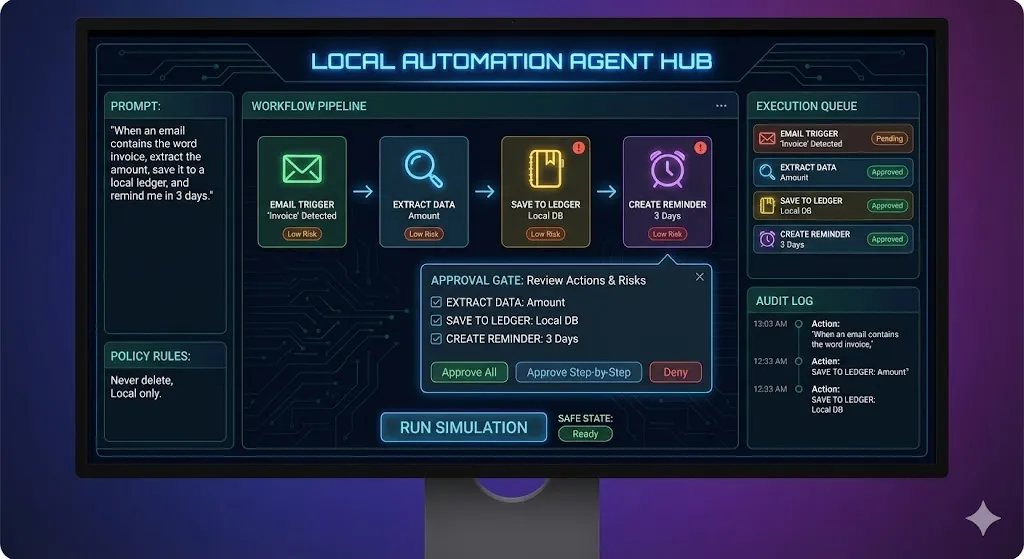
Build a Secure Local AI Automation Agent That Plans, Approves, and Executes Tasks

The user describes an automation in natural language, and the agent must:
1. Convert it into a structured workflow
2. Propose concrete actions as a queued plan
3. Require explicit user approval before any “execution”
4. Execute actions via mock connectors (no real accounts required)
5. Produce a complete audit log and a replayable run history
This app must feel like an automation control center, not a chatbot.
⸻
Core Experience
User types something like:
“When an email contains the word invoice, extract the amount, save it to a local ledger, and remind me in 3 days.”
The agent outputs a workflow with:
• Trigger
• Filters
• Steps
• Outputs
• Risks
• Permissions needed
Then the user can “Run Simulation” to see the actions execute using mock data.
⸻
Required Features
1) Automation Builder (Natural Language → Workflow JSON)
Convert user text into a workflow format like:
• Trigger: Email Received (mock)
• Conditions: subject/body contains keywords
• Steps: Extract fields → Save record → Create reminder
• Outputs: ledger entry + reminder card
Render the workflow visually as a step-by-step pipeline.
⸻
2) Connector System (Mocked but Realistic)
Implement mock connectors (in-app only):
• Inbox Connector: generates sample emails
• Calendar/Reminders Connector: creates local reminders
• Ledger Connector: writes entries to a local table
• Webhook Connector: simulates POST requests and responses
• Notes Connector: saves notes/snippets locally
All connector actions must be logged.
⸻
3) Safety + Approval Gate (Non-negotiable)
Before execution, show an approval modal listing:
• Actions to run
• Data involved
• Risk level per action (Low/Medium/High)
• Required permissions
User must approve:
• Approve all
• Approve step-by-step
• Deny (and edit workflow)
No silent execution.
⸻
4) Agent Loop UI
The agent must visibly follow:
Interpret → Plan → Ask Approval → Execute → Verify → Summarize → Suggest Improvements
Show this as a timeline with statuses.
⸻
5) Audit Log + Run History
Store each run locally with:
• timestamp
• workflow JSON version
• inputs used
• steps executed
• outputs produced
• errors and retries
Allow “Replay Run” with same inputs.
⸻
Unique Twist
Add “Policy Rules” the user can set, such as:
• Never delete anything
• Never send outbound messages
• Never run high-risk actions without step approval
• Only allow saving data locally
The agent must enforce these rules when generating plans.
⸻
UI Requirements
Dark mode only, clean operator dashboard.
Layout:
Left: Automation prompt + policy rules
Center: Workflow pipeline (editable steps)
Right: Execution queue + audit log
Include:
• Step cards with icons
• Risk badges
• Run button with safe states
• Export workflow JSON button
⸻
Technical Requirements
• Single-page app
• Pure HTML/CSS/JS
• No external libraries
• LocalStorage persistence for workflows + run history
• Modular architecture:
• workflow parser
• policy engine
• connector runtime
• logger
Include a mock AI layer (a function) that can be swapped for real API later.
⸻
Internal AI Prompt Template
You are an automation agent.
Convert the user request into a safe workflow with:
• Trigger
• Conditions
• Step-by-step actions
• Outputs
• Risk level per step
• Required permissions
• Notes on safety
Follow policy rules strictly. Do not include actions that violate rules.
User request:
{{USER_TEXT}}
Policy rules:
{{POLICY_RULES}}
Return structured JSON only.
⸻
Output Requirements
Return:
1. Complete runnable app code
2. Explanation of workflow JSON format
3. Explanation of policy enforcement
4. Notes on swapping mock AI for a real API safely
No placeholders. No pseudo-code.
Tags
Here is a strong, thoughtful Additional Details section (under 2000 characters) designed to increase credibility, depth, and perceived value:
⸻
Additional Details
This project is not about building another chatbot with buttons. It is about designing a visible, controllable agent loop that users can trust.
The difference between a basic automation tool and an OpenClaw-style agent is transparency. Every step must be inspectable. Every action must be approved. Every result must be logged.
If the user cannot see what the agent is planning, it is not an agent system — it is a black box.
Architectural Philosophy
Design this system around four isolated layers:
1. Intent Interpreter
2. Workflow Planner
3. Policy Engine
4. Connector Runtime
Do not mix planning logic with execution logic. The power of this app comes from clean separation of concerns.
Safety First
The approval gate is not optional. It is the core differentiator. Many automation tools fail because they execute too early. This system must:
• Display risk levels clearly
• Require explicit approval
• Enforce policy constraints
• Log every action
Transparency builds trust.
Real-World Design Insight
When designing AI agents in production environments, the hardest problem is not intelligence — it is control. Users must feel in charge at all times.
That is why:
• Policy rules should override AI suggestions
• High-risk steps should require step-by-step confirmation
• Every run should be replayable
Performance & Scalability
Keep workflow state as structured JSON.
Persist run history locally.
Avoid heavy re-renders during execution simulation.
This tool should feel fast and deliberate.
Product Mindset
This is not a toy experiment.
It should feel like the foundation of a serious automation operating system.
If the UI feels calm, the logic feels structured, and the agent never surprises the user — the outcome is successful.
Save Prompt